
Welcome to visit our new website: www.szpds.com

7 Tips for Buying Precision Ag Equipment

Leave Your Message

0%

Look, precision ag equipmentcan make field work more precise—no argument there. But just throwing out a feature list doesn’t really show its value. The USDA’s Economic Research Service put out a 2023 report, Precision Agriculture in the United States: Adoption and Use, and it shows how adoption varies quite a bit depending on the crop, the size of the farm, and the technology itself. Here’s the thing: that variation really matters. A guidance system that saves time on big, open fields might not be worth much on smaller or oddly shaped plots. So before you buy, think about your own fields, how you actually work, and what you genuinely need to measure.

Precision-agriculture economist Dr. James Lowenberg-DeBoer put it pretty simply: ‘The value of precision agriculture lies in better farm decisions, not technology alone.’ That’s a good lens to look through when you’re sizing up any new gadget. Will it actually cut down on overlap? Can its data play nice with the displays and software you already have? And let’s be honest—what happens if a sensor dies right in the middle of planting? So before you commit, push dealers for a real demo in the field, ask for realistic setup costs, find out how fast service actually responds, and make sure you understand exactly what they’re doing with your data. Honestly, it’s the little details that really matter, you know?

Honestly, there’s no single “best” machine out there. A 2024 report from the Association of Equipment Manufacturers and AgGateway made a good point: interoperability across ag tech really matters. But just because a company says something’s compatible doesn’t mean you should take their word for it—you’ve got to test it in the real world. Look at total cost of ownership, training time, and when you’d actually break even, then stack that up against your own records. Garbage in, garbage out, right? Imperfect data leads to imperfect decisions. If you’re trying to figure out whether Precision Ag Equipment is really worth it, these seven tips should give you a pretty solid idea—both what it can do and where it falls short.
7 Tips for Buying Precision Ag Equipment

Define Your Farm’s Precision Agriculture Needs

Before shopping for Precision Farming Equipment, write down the decisions you want better data to support. Are you trying to vary seeding rates, map nutrient needs, guide field passes, or track irrigation? A yield map looks useful, but it may not help if you cannot act on it. Walk through a typical day and note where measurements could change a real task. Keep it specific.

Check what your operation can support. Record tractor and implement connections, field size, terrain, cellular coverage, and the software or files your team already uses. Ask whether data can move between tools without repeated manual entry. A small test on one field can reveal setup problems before you commit. Start there. Also consider who will calibrate sensors, review maps, and troubleshoot during a busy week. If one person handles everything, added complexity matters. That part is easy to underestimate.

Set a practical budget that includes installation, training, maintenance, and any recurring service fees—not just the purchase price. Compare options against your written needs, and ask suppliers for clear compatibility details and realistic support response times. I’d leave room for uncertainty: field conditions vary, and a tool that works neatly in a demonstration may need adjustment at home. That is worth admitting. A short trial, with a few measurable goals, can show whether the equipment fits your workflow before you expand.

Set a Budget and Compare Total Ownership Costs

A purchase price is only the first number to write down. Set a budget that includes delivery, setup, operator training, and any required software or data subscriptions. Then estimate annual costs for fuel, maintenance, repairs, insurance, and storage. Ask for a written service schedule, and check what routine calibration actually involves. Small costs add up.

Compare Precision Agriculture Equipment by total ownership cost over the years you expect to use it, not just by sticker price. A machine used across many fields may justify a higher payment if it saves labor or reduces overlapping passes. But those savings depend on your soil, field layout, and operator skills. Be honest about how often you will use advanced features. A capability that sits idle still costs money.

Build a simple spreadsheet with purchase price, financing, expected repairs, consumables, and likely resale value. Include downtime, too: a missed planting window can matter more than a modest repair bill. Ask neighboring operators about service response times, but treat their experience as one data point. Estimates are imperfect. Revisit them after each season, because actual fuel use or repairs may differ from the sales projection. I would leave room for an unexpected cost; forecasts rarely get every detail right.

Check Compatibility With Existing Farm Technology

Before buying Precision Agriculture Equipment, compare its requirements with the technology already on your farm. Check the cab display, receiver, steering controls, and implement connections—not just the product description. A connector may fit while still failing to transfer the right signals. Confirm supported communication standards, such as ISOBUS, and ask which software versions are required. Small mismatch, big delay.

Check positioning needs, too. A new receiver may depend on a correction service your current setup cannot use. For data tools, verify that field boundaries, guidance lines, and machine records can move between systems in usable formats. Ask for the details in writing; “compatible” can mean only basic connection, not full functionality. It is easy to assume that last year’s settings will carry over. They may not.

Before peak season, arrange a practical test with your own tractor or implement, if possible. Confirm that controls respond, maps load, and recorded work appears where expected. Test it in daylight. Keep a note of settings and software versions, and identify who can help troubleshoot after installation. A short test will not reveal every issue, but it can expose awkward steps—like entering the same field information twice—before they become part of a busy workday.

Evaluate Accuracy, Durability, and Key Features

Precision ag equipment earns its value through repeatable measurements, not impressive specifications alone. Before buying, compare stated accuracy with performance under your own field conditions. A stable signal, correct setup, and operator technique can all affect results. Check whether readings remain consistent across several passes, including along uneven ground. Small differences matter. When evaluating Rtk Survey Equipment, ask how the system handles signal interruptions and how quickly it returns to a reliable fix. Test it near tree lines or buildings if those are common on your farm.

Durability matters when equipment faces dust, vibration, rain, and frequent handling. Inspect cable connections, mounting points, seals, and screen visibility in direct sunlight. Ask about service intervals, replacement parts, and support response times; a rugged casing is not the whole story. Features should fit the work. Guidance, mapping, and data export may be useful, but only if they work with your existing displays and record-keeping process. Try the controls with gloves on. It is easy to overvalue a long feature list and overlook a confusing menu. A short field trial can reveal that gap before purchase.

7 Tips for Buying Precision Ag Equipment: Evaluate Accuracy, Durability, and Key Features

Typical horizontal positioning accuracy varies by correction method. Lower values indicate greater accuracy; actual results depend on equipment, signal availability, terrain, and operating conditions.

Use accuracy figures as a starting point. Before buying, check compatibility with your guidance system and implements, field durability, correction-service coverage, ease of setup, support, and total ownership costs.

Research Vendors, Support, and Training Options

When comparing precision agriculture equipment, look beyond the feature list and ask how the vendor supports everyday use. Request a live demonstration with your own field data, if available. Watch how the system handles weak signals, uneven field boundaries, and a busy cab. Ask who answers support calls during planting or harvest, and what response times are typical. That matters. A polished sales demonstration cannot show every problem that appears after installation. Ask for written service terms, software update details, and clear guidance on data access and export.

Training deserves the same attention as hardware. Find out whether instruction is hands-on, remote, or both, and whether new employees can join later. A short session in the cab may help more than a thick manual, but follow-up materials still matter. Ask for a sample lesson and confirm that training covers setup, calibration, troubleshooting, and seasonal changes. Ask directly. If support depends on one local specialist, consider what happens when that person is unavailable. It is easy to assume the team will learn quickly; in practice, rushed training can lead to unused features or inconsistent field records. Compare vendors using the same questions, then note where answers are specific, vague, or still need verification.

7 Tips for Buying Precision Ag Equipment — Research Vendors, Support, and Training Options
Tip What to Evaluate Questions to Ask Useful Evidence
1. Define the job first Match the equipment to specific field tasks, crops, machine types, and operating conditions. Consider whether you need guidance, section control, variable-rate application, mapping, or another function. Which operation should this system improve? What accuracy and coverage do my fields and tasks actually require? A written list of required functions, current equipment details, field conditions, and measurable goals.
2. Check compatibility Confirm that displays, receivers, controllers, implements, correction services, and farm-management software can exchange the data you need. Compatibility can vary by model, configuration, and software version. Will the system work with my existing machines and data workflows? Are adapters, subscriptions, or upgrades required? Written compatibility information, supported file formats, connection requirements, and a demonstration using your intended setup.
3. Compare total ownership costs Look beyond the purchase price. Include installation, calibration, recurring service fees, connectivity, repairs, replacement parts, upgrades, and staff time. Which costs recur each year? What is included in the quoted price, and what is optional? An itemized quote, subscription terms, warranty details, and a cost estimate over the planned ownership period.
4. Research vendor support Assess the availability and scope of technical help, local service, troubleshooting, and repairs during critical field periods. How can I reach support? What are the service hours, response process, and options when an issue cannot be solved remotely? Written support terms, service coverage details, escalation steps, and references from users with similar equipment needs.
5. Plan for training Check whether training covers setup, operation, data handling, calibration, and common troubleshooting. Consider training for every person who will use the system. Is training available on-site or remotely? Are refresher sessions or practical field instruction offered? A training outline, delivery options, fees, and a plan for getting new or seasonal operators up to speed.
6. Test the workflow before buying Evaluate the complete process, from creating a field boundary or prescription to operating the equipment and reviewing the resulting data. Can I test the system with a representative field, implement, and data workflow before committing? A hands-on demonstration or trial with clear evaluation criteria and confirmation of how data can be exported and retained.
7. Review data access and future needs Understand who can access farm data, how it is stored, what export options exist, and whether equipment can be expanded or updated as needs change. Can I download my records in a usable format? What happens to access and stored data if I stop a service? Plain-language data and subscription terms, export examples, update policies, and a plan for future equipment changes.

Compare Financing, Warranties, and Upgrade Paths

Precision equipment can improve field records, but the purchase price is only one part of the decision. Compare financing offers by total repayment, fees, payment timing, and seasonal flexibility, not just the monthly amount. A payment due before harvest may strain cash flow, even when the rate looks attractive. Ask whether early repayment carries a charge, and get every quoted term in writing. The numbers matter.

Warranty details deserve the same careful reading. Check which components are covered, how long coverage lasts, and who pays for travel, labor, or shipping. A receiver, display, and correction service may have different coverage terms. Ask how quickly repairs are typically handled during planting or harvest, when downtime is costly. A long warranty is not automatically a useful one.

Think about upgrade paths before choosing a system. Can it accept new implements, software, or correction options without replacing the core display? Confirm compatibility with your existing equipment and ask what upgrades cost in practice. Rtk Gps Survey Equipment can offer precise positioning, but its value depends on setup, signal access, and support in your fields. It is tempting to plan for every future feature; that can lead to paying for capacity you may never use. A simple compatibility list can expose gaps—and sometimes the answer is not obvious.

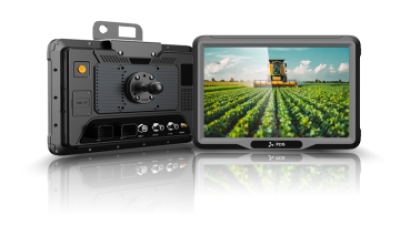
Vehicle Tablet T12 with RTK GNSS: Precision Navigation for Demanding Field Operations

The Vehicle Tablet T12 with Rtk Gnss is built for demanding field operations where dependable positioning and clear, accessible information matter. Its optional RTK GNSS configuration supports centimeter-level positioning, helping teams carry out precision navigation and guidance tasks. A 12-inch, full-lamination IPS multi-touch display with 1280 × 800 resolution and 450-nit brightness remains easy to view in outdoor conditions, while the automotive-grade octa-core processor is designed for reliable operation in vehicle environments.

For integration across different vehicles and equipment, the tablet offers flexible configuration options and support for Android 13 or Linux. Its interfaces include two CAN networks, RS232, RS485, GPIO, Ethernet, and connections for up to four 720P cameras. 4G LTE, Wi-Fi, and Bluetooth 4.0 BLE enable data exchange, remote dispatch, diagnostics, and cloud synchronization in the field.

A 9–36V power input and ISO 7637-II compliance support installation in vehicle electrical systems. The rugged enclosure is rated IP66 and designed to meet the MIL-STD-810 vibration standard, with an operating temperature range of -20°C to +70°C. These features make the T12 suitable for field workflows that call for precise positioning, durable hardware, and adaptable system connectivity.
FAQS

What should I decide before buying precision agriculture equipment?

Write down which decisions need better data. These might include seeding rates, nutrient needs, field passes, or irrigation. A map is useful only when you can act on it.

How can I check whether equipment fits my operation?

Record tractor and implement connections, field size, terrain, and cellular coverage. Check whether your current software can exchange data without repeated manual entry. Details matter.

Why test equipment on one field first?

A small trial can reveal setup problems before you expand. Choose a few measurable goals, such as smoother field passes or easier map review. Start small.

Who should handle calibration and data review?

Decide who will calibrate sensors, review maps, and troubleshoot during busy weeks. If one person handles everything, extra complexity may become a burden. It is easy to underestimate.

What costs belong in the equipment budget?

Include delivery, installation, training, software fees, maintenance, repairs, and storage. Check the service schedule and ask what routine calibration requires. Costs add up.

How should I compare equipment costs?

Compare expected ownership costs over the years you plan to use the equipment. Include financing, consumables, repairs, and possible resale value. A spreadsheet helps.

Are advanced features always worth paying for?

Not necessarily. A feature that rarely gets used still costs money. Consider your fields, soil, and operator skills before assuming it will save labor.

How should I account for downtime and uncertain estimates?

Include downtime in your calculations. A missed planting window may matter more than a small repair bill. Review fuel use and repair costs after each season. Forecasts can miss details.

Conclusion

Choosing Precision Ag Equipment starts with understanding your farm’s specific needs, from the tasks you want to improve to the technology already in use. Set a realistic budget and look beyond the purchase price by considering installation, maintenance, training, and other costs over the equipment’s lifetime. Check that new tools can work with your existing systems, and compare their accuracy, durability, and features against the conditions and demands of your operation.

Before making a decision, research vendors’ support services and training options so you know what help is available after purchase. Compare financing terms, warranty coverage, and opportunities to upgrade as your needs change. A careful evaluation of these factors can help you choose equipment that fits your farm, supports efficient work, and offers lasting value.

Oliver

Oliver

Oliver is a dedicated marketing professional at PDS, a leading manufacturer based in Shenzhen, China, specializing in centimeter-level high precision RTK GNSS navigation and positioning vehicle mount computers. With a deep understanding of the company’s innovative offerings, Oliver consistently……

Previous Why Choose Windows Rugged Tablets for Business?


Leave Your Message (Inquiry)